Tuesday, November 21, 2006

JSON Inpsector (for GData)

Yesterday, I was very excited to announce JSON support for GData on the Google Data APIs Blog. Even though we provided some nice documentation and samples for this new feature, I thought it would be helpful to be able to browse the structure of the JSON returned by the feed in a standard tree widget.

In Chickenfoot, you can inspect a JavaScript object fairly easily by leveraging the DOM Inspector:


function inspect(obj) {
// explore obj in Firefox's DOM Inspector
window.openDialog('chrome://inspector/content/object.xul',
'_blank', 'chrome,all,dialog=no', obj);
}


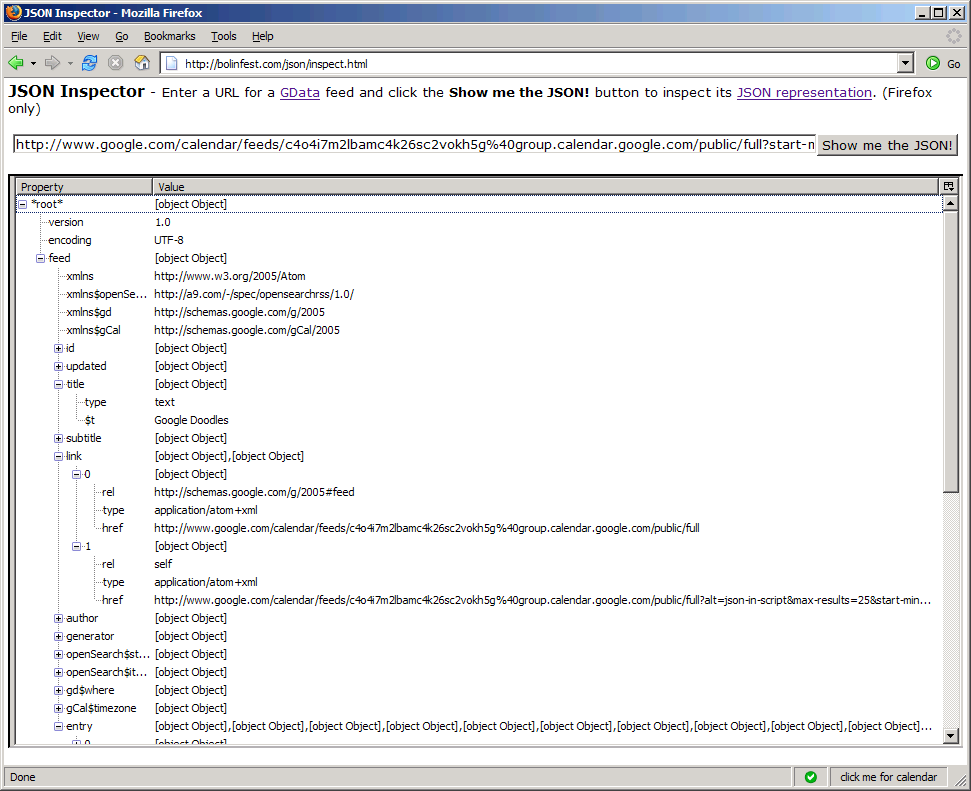
Unfortunately, this JavaScript does not work in a web page because it needs access to the browser chrome. Because not everyone has Chickenfoot installed, I decided to make an online JSON Inspector for GData feeds (shown below) where you can simply enter the URL for a GData feed and click Show me the JSON! to explore its structure with a standard XUL tree widget. (Because this web page uses XUL, it only works in Firefox.)

Hopefully this will help you write your first GData mashup over the Thanksgiving holiday! You'd rather hack on JavaScript than fight your way through the mall on Black Friday, right?

Update (11/22/2006): Mihai just pointed me to an existing JSON Inpsector targeted at JSONP (JSON with Padding), which lets you inspect JSON from sources other than GData.


Screenshot of JSON Inspector for GData


P.S. If any of you decide to host XUL files on your own webserver, make sure to add the following line to httpd.conf or else your XUL trees may appear strangely:


AddType application/vnd.mozilla.xul+xml .xul

Tuesday, November 14, 2006

Introducing Gvite (a Firefox extension)

Okay, so I'm a little upset that Evite has links to add an event to both Outlook and iCal, but not Google Calendar, so I decided to write a Chickenfoot script to deal with the problem. My script adds the following when visiting an Evite invitation: (1) It replaces the "View Map" link with a link to Google Maps, and (2) it adds a button that lets you add the event to Google Calendar. I used Chickenfoot's packaging tool to package the script as a standalone Firefox extension (click this link to install it).

I have to admit that I really hacked this script together, and my only test cases were the two Evites that are currently in my inbox, so I haven't been very thorough. If you look through the source code for the Chickenfoot script, you'll see that I have some TODOs in the code, so I already know about some of the shortcomings. That being said, please feel free to email me with improvements to the script. (If there's enough interest, we could move this to the Chickenfoot Script Repository so we can leverage the power of Web 2.0 to handle all of the Gvite edge cases!)

Friday, November 10, 2006

Did I mention mitcalendars.com?

No, I don't believe I did, but it yesterday (my birthday, for those of you who forgot), mitcalendars.com appeared on the Google Code Featured Projects blog. I created mitcalendars.com with fellow Googler and MIT alum Mike Lambert a few days after the fall semester started at MIT.

So why didn't you post about this weeks ago?, you wonder. Well, here's what happened: Mike and I were eating lunch at Google, and I was expressing my disappointment that MIT would be an unlikely candidate for Google Apps for Your Domain because it has already invested a lot in its Athena computing system, and people would freak out if they couldn't use Pine or mh or whatever junk people who don't use Gmail use. What I really wanted, of course, was for every MIT professor to enter his or her syllabus in Google Calendar, which would save students the trouble of figuring out recurrence rules and determining which MIT Tuesdays are actually Mondays.

But then Mike raised the key question: "Why don't we create all the calendars for them?" Upon hearing this, I immediately realized that this was one of those ideas that was just so stupidly obvious that we needed to drop everything and just start building it. So we did.

We decided that the interface that would be most familiar to students would be one that paralleled MIT's online course directory. We would simply copy the HTML from the directory, and in the spirit of not being evil, would provide links to make it trivial to add the course schedule to Sunbird or iCal as well as Google Calendar.

As it turned out, Mike and I were already scheduled to fly to MIT that weekend for some on-campus recruiting. In many ways, it was fitting that we didn't sleep at all on the red-eye, discussing our design, and then went straight from Logan to the MIT student center (I got the first LaVerde's breakfast sandwich of the day!), and continued hacking until we had published the site.

Of course, we couldn't contain our excitement, and showed off our work to some MIT students who were passing by. One common reaction, which both excited and disappointed me, was, "Oh man -- I wish you had that a week ago! I already uploaded all of my courses to Google Calendar!" Clearly the early bird catches the worm, and the early bird was not us.

We sent the URL around, and the site got some uptake, but it didn't generate as large a response as we had hoped. There were definitely a number of things we did wrong (I hope no one accidentally goes to class on Thanksgiving because of us, or misses their final exam, for that matter), but now we know how we can do better (and that we should act earlier) next semester. Although we'll be sure to look out for that second-system effect we learned about in 6.033, you can expect a better version of mitcalendars.com for the spring semester, so be sure to check back in February!
Sunday, November 5, 2006

GCalQuickTab for your Domain!

I released a new version of GCalQuickTab that works with Google Apps for Your Domain (GAFYD). It may not be that exciting for most of you, but if you use Google Apps, it's a lifesaver!

Saturday, November 4, 2006

TargetAlert 0.8.9.8 Released

I received several requests to update TargetAlert so that it is compatible with Firefox 2.0. As 2.0 has been out for awhile now, this is a reasonable request, so I finally made a new version (0.8.9.8) available here on bolinfest.com:

http://www.bolinfest.com/targetalert/download.html

All I did was download TargetAlert.xpi from bolinfest.com, unzip it, changed some version tags, and reposted the thing. That means version 0.8.9.8 does not have the features that the 0.9 preview release has, and that the memory leak is still at large.

I do plan to figure out what's causing the memory leak and release a 0.9 version with support for custom alerts. I don't know when I'll have time to do it, though, because I'm caught up in a handful of other side-projects right now and I'd like to get those out the door. (New code is always more exciting than old code, isn't it?)

Wednesday, August 2, 2006

My 55 Minutes of Fame

Last week, I gave a Tech Talk at Google with Rob Miller about Chickenfoot. You can read about it on Chickenfeed, the Chickenfoot blog. If you want to get a higher quality copy of the video, check out the new Chickenfoot publications page.

I actually spent weeks preparing for this talk -- not so much for the presentation itself, but we wanted to have a fresh version of Chickenfoot with lots of new features available for people to download after the talk. And we did! Now you can create a Firefox extension in under a minute using Chickenfoot, which I think is pretty cool.

Speaking of Firefox extensions, maybe I can get back to TargetAlert 0.9 now that the talk is behind me...

Sunday, June 25, 2006

TargetAlert 0.9 Preview Available

I have made a preview release of TargetAlert 0.9 available that finally lets you create your own alerts through the UI. Everyone has been asking for this feature since day one -- I'm sorry that my other projects prevented me from taking care of this sooner!

If you find any bad bugs in the preview, then please let me know so I can fix them before I make an official 0.9 release. Once I finish writing up the documentation for this new version, I will push everything to bolinfest.com, so this little beta test should not last very long.